
Copilot is already switched on. So why is it still barely part of how people work?
Copilot is available across your organisation, but most people have opened it once, asked it something vague and gone back to doing things the old way. Without a clear starting point, a powerful tool sits unused next to the apps people work in every day.
This three-hour, beginner-friendly session gives your people a plain-English starting point and a habit they can build on. We run it in two versions, so it fits the Copilot you actually have.
Which version is right for you?
Copilot Standard
For organisations using Microsoft 365 with Copilot’s core features.
Copilot Premium
For organisations with Copilot Premium switched on within their Microsoft subscription, ready to use it inside their everyday apps.
Not sure which you have? Your IT team can confirm, or book a free call and we’ll help you work it out.
We recommend:
In person or online
3hrs
20 people
What you’ll learn & do
For Copilot Standard:
- A plain-English introduction to Copilot as a thinking partner
- How to write prompts that get a useful answer first time, with before-and-after examples
- How to draft, rewrite and summarise your own emails, notes and documents
- How to prepare for meetings and turn notes into clear next steps
- How to check Copilot’s output and keep your own voice
For Copilot Premium:
- A plain-English introduction to Copilot as a thinking partner
- How to use Copilot in Outlook to draft, summarise threads and pull out actions
- How to use Copilot before, during and after Teams meetings, from agendas to next steps
- How to go from blank page to first draft in Word, Excel and PowerPoint in minutes
- A first look at agents, and how to start building one for a task you repeat often

94%
of participants would recommend our workshops
Who is this workshop for?
- Organisations where Copilot is available but adoption is patchy
- Teams on Copilot Standard who want a confident, practical starting point
- Teams on Copilot Premium who want to use it inside Outlook, Teams, Word, Excel and PowerPoint
- IT, L&D or HR leads who need Microsoft 365 and Copilot to show up in daily habits
- Mixed audiences, from keen early adopters to sceptics who tried it once and went back
What this workshop offers
- Learning by doing. A practical, hands-on session built around the tools your people already use every day.
- Learning that lasts. Every participant gets access to the Productivity Ninja® Academy.
- Two versions, one session. Choose Copilot Standard or Copilot Premium, and your people practise with the tools they actually have.
- Built to stick. Add an Impact Clinic 1 and 3 months later to keep new habits alive.
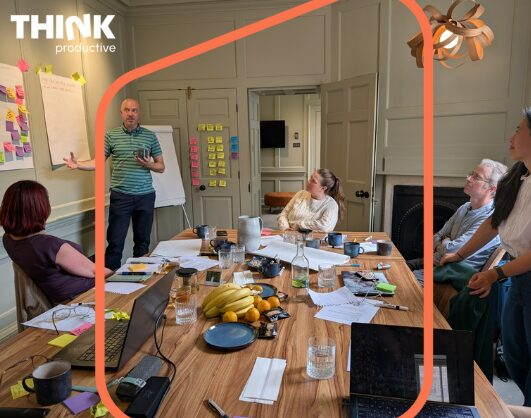
What you’ll do
You’ll start with what Copilot is good at, and how to treat it as a thinking partner. Then you’ll learn a simple way to structure a prompt and try it on your own work. For example: “Summarise this thread in three bullets and list who owes me what by when.” One line like that gives you something you can use straight away.
In the Standard session, you’ll practise drafting, rewriting and summarising with the text you bring along, preparing for meetings, and turning notes into clear actions. You’ll also practise checking Copilot’s output before you rely on it. You’ll leave with a handful of prompts you’ve already tried on your own work and a simple routine for using Copilot every week.
In the Premium session, you’ll use Copilot inside the apps you work in every day. In Outlook, that means drafting replies, summarising long threads and pulling out actions. In Teams, it means using Copilot before, during and after meetings, from sharper agendas to clear next steps. In Word, Excel and PowerPoint, it means going from a blank page to a first draft in minutes, including building a presentation from an existing document or notes. You’ll also get a first look at agents: specialist assistants built for a task you repeat often, and how to start building one.
Everyone leaves knowing where they’ll use Copilot tomorrow morning.
Boots
“Think Productive have helped me leave a legacy here. And their team really do walk the talk, they fully embody their brand.”
L&D Manager
Why it matters
Copilot doesn’t fail because it isn’t capable, it fails because nobody’s shown people how to actually use it in the flow of their day.
- Licences sit switched on but unused, so the investment doesn’t pay off
- People try Copilot once with a vague prompt, get a generic answer, and give up
- Without a shared starting point, adoption stays patchy: a few enthusiasts, everyone else sceptical
Benefits & Results
The most immediate benefit is momentum: people leave with two or three concrete ways they’ll use Copilot the next day, not a vague sense that they should try harder. But the deeper shift is confidence. Once people see Copilot work well in a tool they already use, they stop treating it as an experiment and start treating it as part of how they work.
What your organisation gets
A team that’s actually using the licences you’re paying for, with smarter meetings, less admin, clearer next steps and better-quality communication across email, meetings and documents. Consistency at scale, not just a handful of enthusiasts getting ahead.
What happens when Copilot adoption works
When teams learn to use Copilot with intention, everything changes:
- Inboxes get summarised and actioned in minutes, not left to pile up
- Meetings start with a sharper agenda and end with clear next steps
- First drafts appear in minutes instead of a blank page and a deadline
- People stop asking “is this worth using Copilot for” and just do it
- Confidence replaces scepticism, even for the people who gave up on it once
SHELTER
“Investing in this workshop was one of the best decisions we made for our people and culture.”
Sarat Kumar, CEO, Shelter
Frequently Asked Questions
-
No. The session works whether your organisation is on Copilot Free or has rolled out Copilot Premium licences. Everyone gets a practical introduction to using Copilot well in Outlook, Teams, Word and PowerPoint, and if you’re on Premium, we’ll also cover agents and the extra features that come with it.
-
Both give people a plain-English introduction, a simple prompt structure and a weekly habit. The Standard session focuses on drafting, rewriting, summarising and meeting preparation using content people bring along. The Premium session adds hands-on use inside Outlook, Teams, Word and PowerPoint, plus a first look at agents.
-
Yes. The session is built for exactly that mix. Beginners get a clear starting point, and people who’ve dabbled with Copilot but not built a habit around it get practical ways to go further.